
What symptoms lead me to check my RAM for errors?
If your computer hangs sometimes or several times a day while watching a movie, using a program, surfing the internet, chatting with someone or any other activities there might be a problem with your RAM, I know that the cause of a computer being hanged may vary and there might be several reasons behind that but one of those reasons is the RAM and thats why we should check out ram for issues.
What does a RAM mean?
The RAM is a fundamental component for all computers and laptops, hence without having a RAM installed on your motherboard will prevent that particular computer from booting and working (it will act as a dead PC).
The RAM is handling all CPU processes and any system operations, any software or program needs a RAM to be working, so some heavy software like 3DMAX or Autocad or even PC games require a high RAM requirements in order to be working.
[scheaven_infobox color=”grey” width=”100″ align=”none” icon=”info2″]Note: RAM is one of the factors that a PC performance is depending on, the bigger size of RAM the better performance.[infoclose color=”grey”]What is a RAM size?
RAM measured in Giga Bytes, like this RAM is 2 GB or 4GB, however for more information about RAMs you can read by clicking on the below RAM types:
How to check if my RAM is the cause of my pc problems?
Microsoft has coded a small tool to check any type of RAM for errors called Windows Memory Diagnostic tool, and the good thing about this tool is you don’t execute it from within the Microsoft Windows environments, instead you run it from a bootable CD and it will run its tests as per your requirements, so in this case you will discover if your RAM was the cause of your problems or you may look for other reasons.
How to download the Windows Memory Diagnostic tool?
You can simply download Windows Memory Diagnostic tool from the below button directly from Microsoft Windows website:
[scheaven_button color=”blue” icon=”down” link=”https://www.softpedia.com/dyn-postdownload.php/b3ca3f63ec38962d9d16d9072d6b81be/5b28b9c8/e40/4/2” text=”mtinst.exe Download”]How to use the Windows Memory Diagnostic tool?
By clicking on the button above you will download mtinst.exe file that you need to execute to extract an ISO file called windiag.iso and what you need to do with it is to use one of the CD burning software to extract this ISO file and use it.
[scheaven_infobox color=”green” width=”100″ align=”none” icon=”info”]DO NOT PANIC, THEY ARE SO SIMPLE STEPS AS SHOWN BELOW, EVERYONE CAN HANDLE IT EVEN AVERAGE USERS.[infoclose color=”green”]So now you need to follow the below steps:
- Double click on mtinst.exe and click on run if security alerts shown.
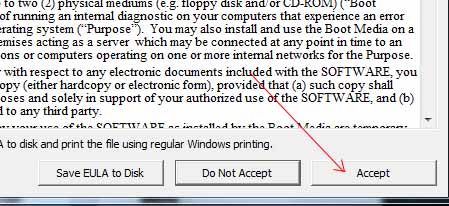
- Click on Accept.
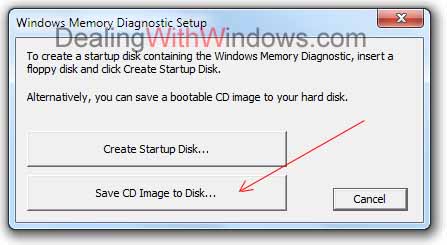
- And because no one is using the floppy disk these days so you have to click on “Save CD Image to Disk“.
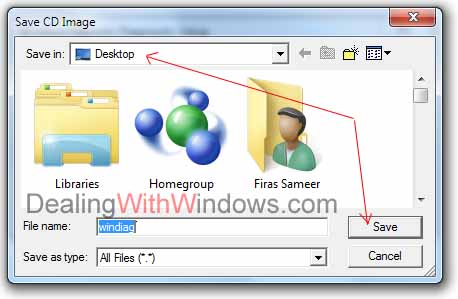
- Save windiag.iso on Desktop for instance.
And by saving the windiag.iso on your desktop you are now required to prepare the below:
- Windiag.iso to be downloaded (already done above).
- CD Burning Software
- Blank CD
- Writable CD/DVD drive.
After downloading the Ashampoo Burning Studio 6, follow the below steps:
- Insert a blank CD into your writable DVD drive.
- Open Ashampoo Burning Studio 6.
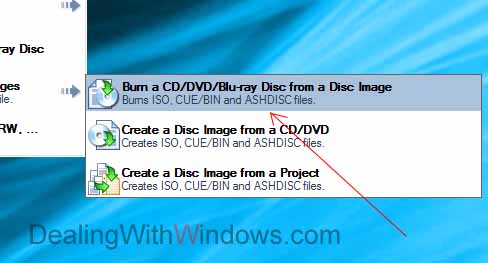
- Hover your mouse pointer over “Create/Burn Disc Images”

- Select “Burn a CD/DVD/Blue-ray Disc from a Disc Image”.
- Browse and select the windiag.iso file you’ve just downloaded and click on Next.
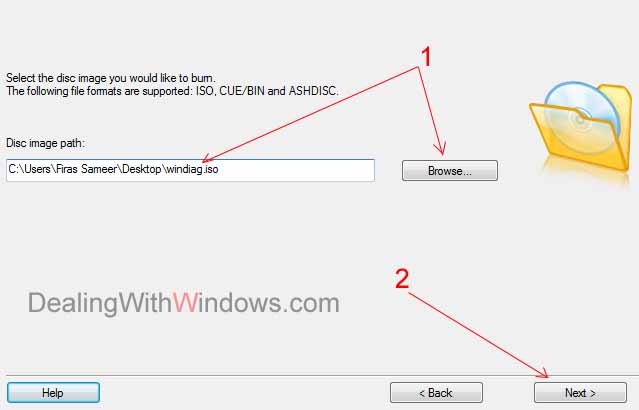
- If your CD is blank, it will show you the green remark, click on Write CD to burn the file in the CD and complete the process.

After completing the burning process, follow the below steps to execute the program from the CD:
- Reboot your computer and make the CD drive is your first bootable option from the BIOS. (a very simple step, to learn more please visit Windows XP installation process page)
- Save your new BIOS settings by pressing F10 and click on Yes to confirm.
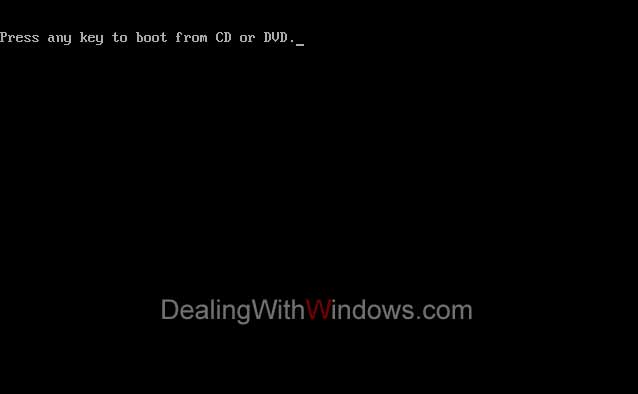
- Your computer will boot again and will ask you to boot from CD/DVD (if you have Windows XP as shown below)
- Press Enter from your keyboard quickly during the 5 seconds time.
- Or will automatically show you the options page (if you are using Windows Vista or Windows 7 as show below).
- Select Windows Memory Diagnostic tool using the arrow keys on your keyboard.
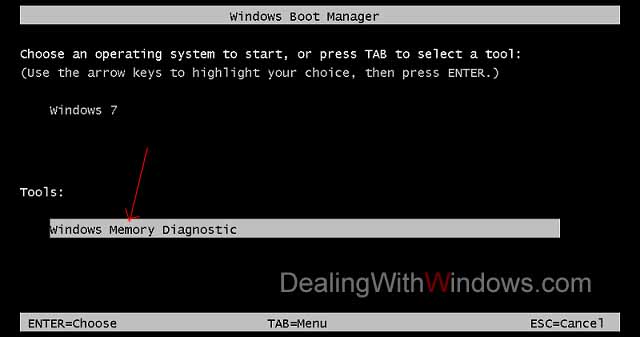
- Hit Enter key from your keyboard.
- Now the tool will start performing the normal test to check your RAM and will be shown just like the below picture.
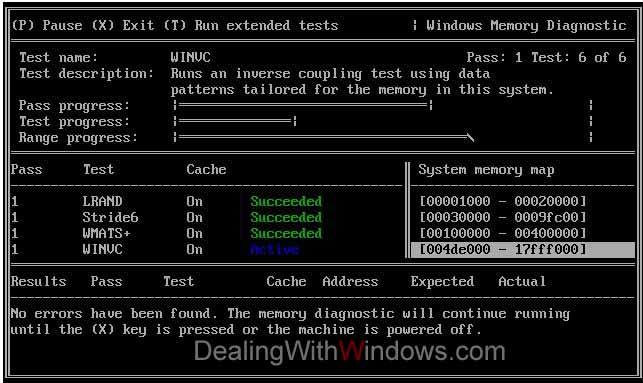
For more advanced settings and tests you can refer to the Windows Memory Diagnostic interface page and options in Microsoft from here.
[scheaven_infobox color=”green” width=”100″ align=”none” icon=”0″]Do you have other methods to scan ram for errors? and what is your experience with this regard ? Feel FREE to post your comments below.[infoclose color=”green”]Recent Posts
If your computer is slow to start, it may be damaged by malware or have too many startup programs. or you may have a hardware or software problem. Some Windows have very impressive startup times,...
Online banking is quick and easy. This is why it is so well-liked by people all around the world. Online payments can also cause trouble. You should take security measures for online banking. Hackers...